

Top AI-Powered CMS Platforms for Corporate Websites
A general counsel emails the web team at 7:42 p.m.: the board approved a new code-of-conduct page, and the disclosure has to be live before the markets open. The PR director needs the press release scheduled for 6 a.m. The IR team is waiting on an 8-K landing page. Three different stakeholders, three different content surfaces, one CMS. If you're running a corporate website at a $200M-$2B company, this scenario is Tuesday. WorkspaceCMS was built for exactly this moment - and you can book a 20-minute walkthrough to see how the managed-change workflow handles after-hours legal requests without firing up a deploy pipeline.
The corporate CMS landscape in 2026
Corporate web teams sit in a strange middle. They're not e-commerce - conversion math doesn't drive every decision. They're not pure brand - the IR page can move the stock. They're not editorial - but legal, comms, HR, IR, and product marketing all push content through the same stack. Whatever CMS you pick has to serve all of them without turning into a permissioning nightmare.
The market has split into three tiers:
- Enterprise legacy: Adobe Experience Manager (AEM), Sitecore XM Cloud, Acquia. Six-figure licenses, dedicated implementation partners, 9–14 month rollouts. Fit for Fortune 500 with a 30-person digital team.
- Mid-market SaaS: HubSpot CMS Enterprise, Contentful, Sanity, Storyblok. Faster to stand up, friendlier pricing, but you still need developers for non-trivial changes.
- Managed AI CMS: WorkspaceCMS and a handful of newer entrants. AI handles SEO surfaces, a human team handles the edits, you stop arguing about backlog.

Adobe Experience Manager (AEM)
AEM is what your CIO recommends because it's "the safe choice." It's powerful. It's also expensive in ways that don't show up on the quote. Licensing runs $250K–$800K per year before implementation. You'll need a partner like Bounteous or Razorfish for the build, which adds another $500K–$2M depending on scope. Internal AEM developers are scarce and command $160K+ salaries.
Where AEM wins
Multi-brand, multi-language, multi-region rollouts where governance complexity is genuinely high. If you're managing 40 country sites in 18 languages with regional legal review boards, AEM's component model and workflow engine earn their keep.
Where AEM loses
Mid-cap companies (the 1,000–10,000 employee band) that bought AEM in 2019 and now use 12% of its capabilities. The TCO conversation is painful because you've already paid for it. AEM also struggles with the modern AI-search reality - there's no native AI Visibility Tracker, and the JSON-LD work still happens in custom components.
Sitecore XM Cloud and Acquia
Sitecore's pivot to XM Cloud (their composable, headless offering) is real and the product is solid. Pricing is friendlier than legacy Sitecore but still lands in the $80K–$200K/year range for typical corporate deployments. The Symposium crowd loves it. Implementation timelines are shorter than AEM but still 4–8 months.
Acquia (Drupal-based) remains popular in government, higher ed, and pharma- verticals where Drupal's permission model and compliance posture have a long history. For pure corporate use cases outside those verticals, Acquia's market share has been eroding to lighter-weight options.
HubSpot CMS Enterprise
HubSpot CMS Enterprise (now $3,600/month minimum) is the answer when your marketing org is already in HubSpot and you want one stack. The CMS is fine. The SEO tools are fine. The content staging is fine. Everything is fine, and that's both the value prop and the limitation.
You'll hit ceilings on schema customization, on multi-brand admin (workarounds exist but they're awkward), and on AI-search visibility tooling. HubSpot's roadmap is heavily marketing-attribution-focused; SEO surfaces get attention but they're not the center of the product the way they are in a pure-play AI CMS.
Where WorkspaceCMS fits
WorkspaceCMS targets the wedge that AEM/Sitecore can't economically serve and that HubSpot/WordPress can't operationally serve: mid-cap and growth-stage corporates that have outgrown WordPress but can't justify $400K/year in licensing. Think $100M–$2B revenue, 500–5,000 employees, a 2–4 person digital team, and a backlog of marketing, legal, IR, and HR content changes that nobody's shipping fast enough.
The architecture is opinionated:
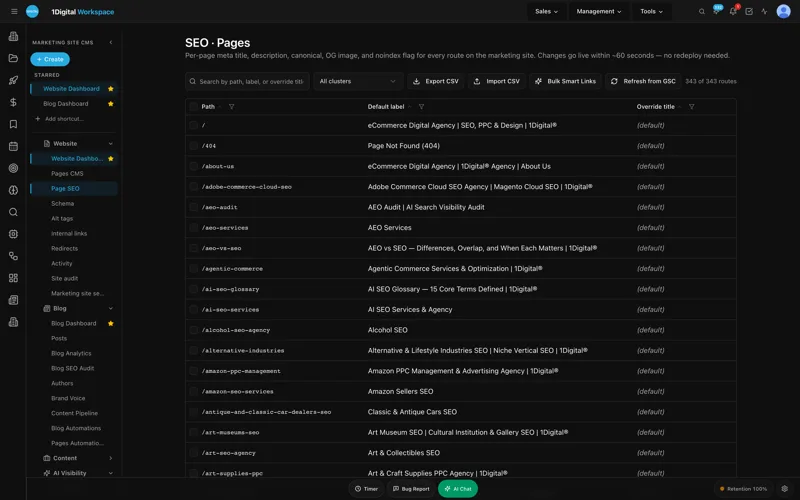
- Role-based access built for corporate teams: Owner, Editor, Viewer roles, plus per-page permissions so legal can lock the disclosures page and PR can lock the press-release templates.
- Audit log on every change - who edited what, when, what changed. Useful for SOX-adjacent governance and for surviving a regulatory exam.
- Managed-change workflow: you send a ticket describing the change, the WorkspaceCMS team ships it on your live site within the SLA. Premium plans (12–24h SLA, 4-hour blockers) match the "live before markets open" scenario from the lede.
- AI Visibility Tracker monitoring how your brand surfaces in ChatGPT, Claude, Perplexity, and Gemini - increasingly material for B2B corporate buyers who research vendors via LLM.
- JSON-LD Editor with templates for Organization, Person (for exec bios), and FAQPage schema.
Corporate-specific use cases WorkspaceCMS handles well
Investor relations (IR) page templates
The IR section of a corporate site has predictable structure: earnings releases, SEC filings, governance documents, analyst coverage, stock information, board bios. WorkspaceCMS ships templates for each of these and the Page Editor lets your IR team update the quarterly earnings landing page without touching code. Stock-ticker integrations and SEC filing feeds are configured once and update via the managed-change workflow.
Careers and employer brand
Careers pages get the most traffic on a corporate site after the homepage. They also rot fastest - job descriptions go stale, team photos age, the "our values" copy gets out of sync with the latest all-hands memo. The AI Blog Generator can draft new content; the Meta Rewriter keeps title/description tags fresh as job listings rotate; the Internal-Link Rules push careers traffic toward open roles automatically.
Governance and disclosure controls
Locked pages. Approval workflows. Audit trail. Required reviewer roles before publish. If your audit committee asks "who approved the change to the supplier code of conduct," there's a log entry with a timestamp and a user ID.
UNLIMITED MANAGED CHANGES
Send a ticket. We ship the change.
Every WorkspaceCMS plan includes unlimited managed CMS edits. Essentials ships in 4 business days. Growth ships in 2. Premium ships in 12–24 hours. Describe what you need and our team builds it on your live site.
Pricing comparison for a 1,200-employee corporate
Real-world annualized cost for a single corporate marketing site (no e-commerce):
- AEM: $280K license + $180K implementation amortized + 1.5 FTE internal devs ($240K loaded). ~$700K/year.
- Sitecore XM Cloud: $110K license + $90K partner retainer + 1 FTE dev. ~$360K/year.
- HubSpot CMS Enterprise: $43K subscription + 0.5 FTE dev + marketing ops. ~$140K/year.
- WorkspaceCMS Premium: $5,388/year subscription + 0 internal dev FTE (managed-change workflow replaces in-house dev capacity for marketing changes). ~$6K/year.
The WorkspaceCMS number isn't apples-to-apples for everyone - if you have a custom commerce stack, a headless storefront, or 20 international subsidiaries, you'll need additional capacity. But for the typical corporate marketing site (homepage, about, leadership, careers, IR, news, products, contact), the math is what it is. See the full pricing page for plan details.
What to evaluate during a corporate CMS RFP
- Time to publish a one-page legal disclosure after hours. If the answer involves a deploy pipeline or a 9 a.m. dev standup, that's a problem.
- Role separation for legal, PR, and IR. Can you scope a user to only the IR section? Can you require dual approval on disclosure pages?
- Audit log depth. Field-level diff, who/what/when, exportable for compliance reviews.
- Schema and structured-data tooling. Native JSON-LD editing, or another custom-component build?
- AI-search visibility. How is the platform tracking your presence in LLM answers? Is there a workflow to fix gaps?
- Site Audit cadence. Are Core Web Vitals, broken links, and missing alt tags monitored continuously, or only when someone remembers to run a scan?
See how WorkspaceCMS handles the managed-change workflow and review the case studies from corporate customers who switched off enterprise platforms.
Migration patterns from enterprise platforms
The most common migration we see is mid-cap corporates moving off AEM after a renewal cycle exposes the TCO. The typical path:
- Audit the current AEM site- page inventory, template inventory, custom-component inventory. Most mid-cap AEM installs are using 15–30 templates and 40–80 components, often a fraction of what was built during the original implementation.
- Map templates to WorkspaceCMS equivalents. The 80/20 rule applies - 20% of the templates produce 80% of the pages. Map those first.
- Build a redirect plan. AEM URL patterns rarely match WorkspaceCMS defaults out of the box. The Redirect Manager handles the bulk mapping, and the Site Audit catches misses post-cutover.
- Content import. Markdown and HTML imports work cleanly; rich-component content sometimes needs manual rework. WorkspaceCMS's content import scripts handle common AEM XML exports.
- SEO equity preservation. The Site Audit runs a pre-cutover scan and a post-cutover scan; the diff identifies any regressions in meta tags, schema, or internal linking.
- Parallel publish for two weeks before cutover so the corporate comms team can verify the new admin works for their workflow before the DNS swap.
Typical migration timeline: 6–10 weeks for a 200–500 page corporate site, including content review and redirect mapping. Compare to AEM-to-AEM-Cloud migrations that typically run 6–12 months.
Compliance and audit-ready operations
The audit log isn't a checkbox feature - for publicly-traded corporates and regulated industries, it's the difference between "we have controls" and "we can prove we have controls." WorkspaceCMS's audit log captures:
- Field-level diffs on every page change (what changed, from what, to what)
- User identity (who made the change, what role they had at the time)
- Timestamp with timezone
- Approval chain when required-reviewer workflows are in play
- Publish vs. draft events distinguished separately
- Exportable to CSV for compliance reviews, SOX walkthroughs, or board reporting
The audit log paired with role-based access satisfies the "separation of duties" question that comes up in IT audits. Editors can't approve their own publishes; reviewers can't author content they then approve.
Top AI-Powered CMS Platforms for Corporate Websites FAQ
Is WorkspaceCMS appropriate for publicly-traded companies?
Yes. The audit log, role-based access, and managed-change workflow are explicitly built for governance scenarios. WorkspaceCMS doesn't replace your Section 16 reporting stack or your investor-portal vendor - it manages your public marketing site, IR landing pages, and corporate disclosure surfaces.
Can we migrate off AEM or Sitecore without losing SEO equity?
The Redirect Manager handles bulk 301 mappings during cutover, and the Site Audit catches missing redirects within 24 hours of go-live. Most migrations preserve organic traffic within 90 days; some see lift from the structured data improvements.
How does the managed-change workflow handle confidential pre-announcement content?
Premium plans support embargoed publish with scheduled go-live times and locked preview URLs. Earnings-day workflows typically use Premium's 12–24h SLA with a same-day publish window.
What about multi-brand corporate parents (holding companies)?
WorkspaceCMS supports multi-tenant admin with white-label theming per brand. A holding company with five operating subsidiaries can run all five sites from one admin with separate role assignments per brand.
Does WorkspaceCMS handle our intranet?
No. WorkspaceCMS is a public-marketing CMS. Intranet, employee portal, and customer-portal use cases need a different tool (typically SharePoint, Workvivo, or a custom internal app).
Ready to see if WorkspaceCMS fits your corporate stack? Book a 20-minute demo and bring your hardest content-publishing scenario. We'll show you exactly how it'd ship.

See how WorkspaceCMS compares.
Book a growth call. We'll show you a live demo of WorkspaceCMS running on a site in your industry.
Want the full picture? Browse more posts