
Website as a Service (WaaS), Explained
What the subscription-website model actually is, how the economics work, how it compares to DIY builders, freelancers, and agencies, and how to tell a good provider from a bad one before you sign.
See it in action
Real sites we designed and built for free


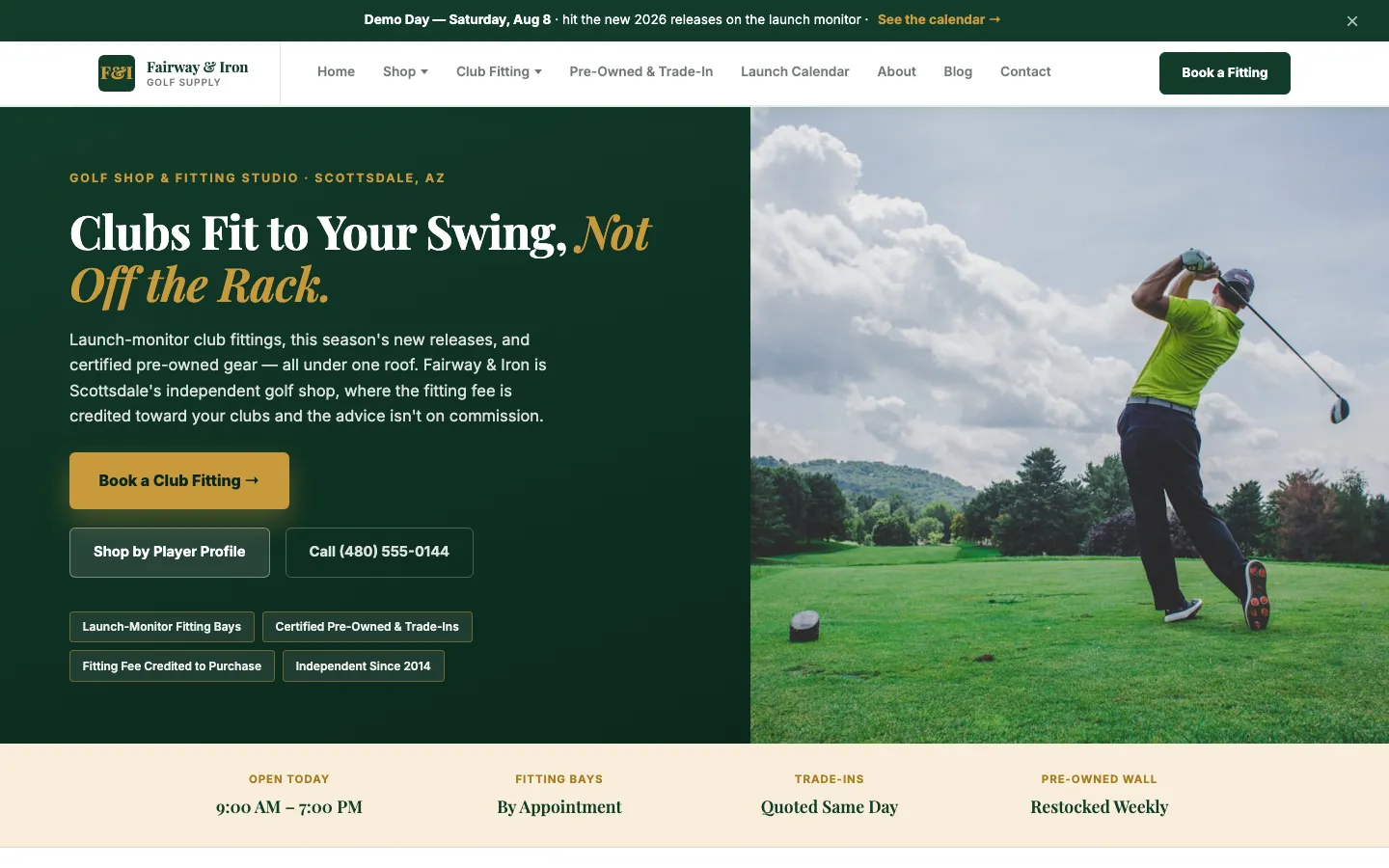

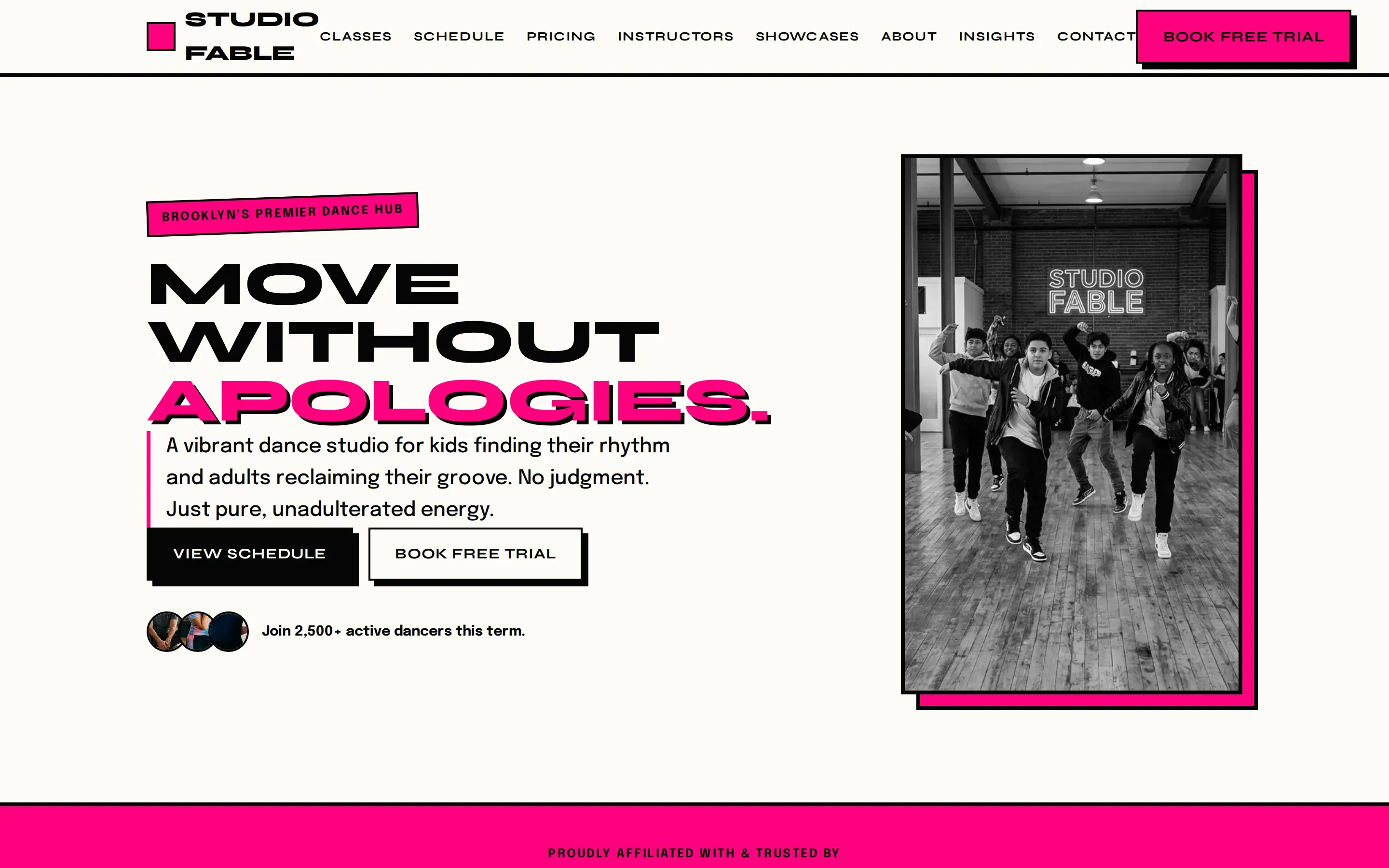
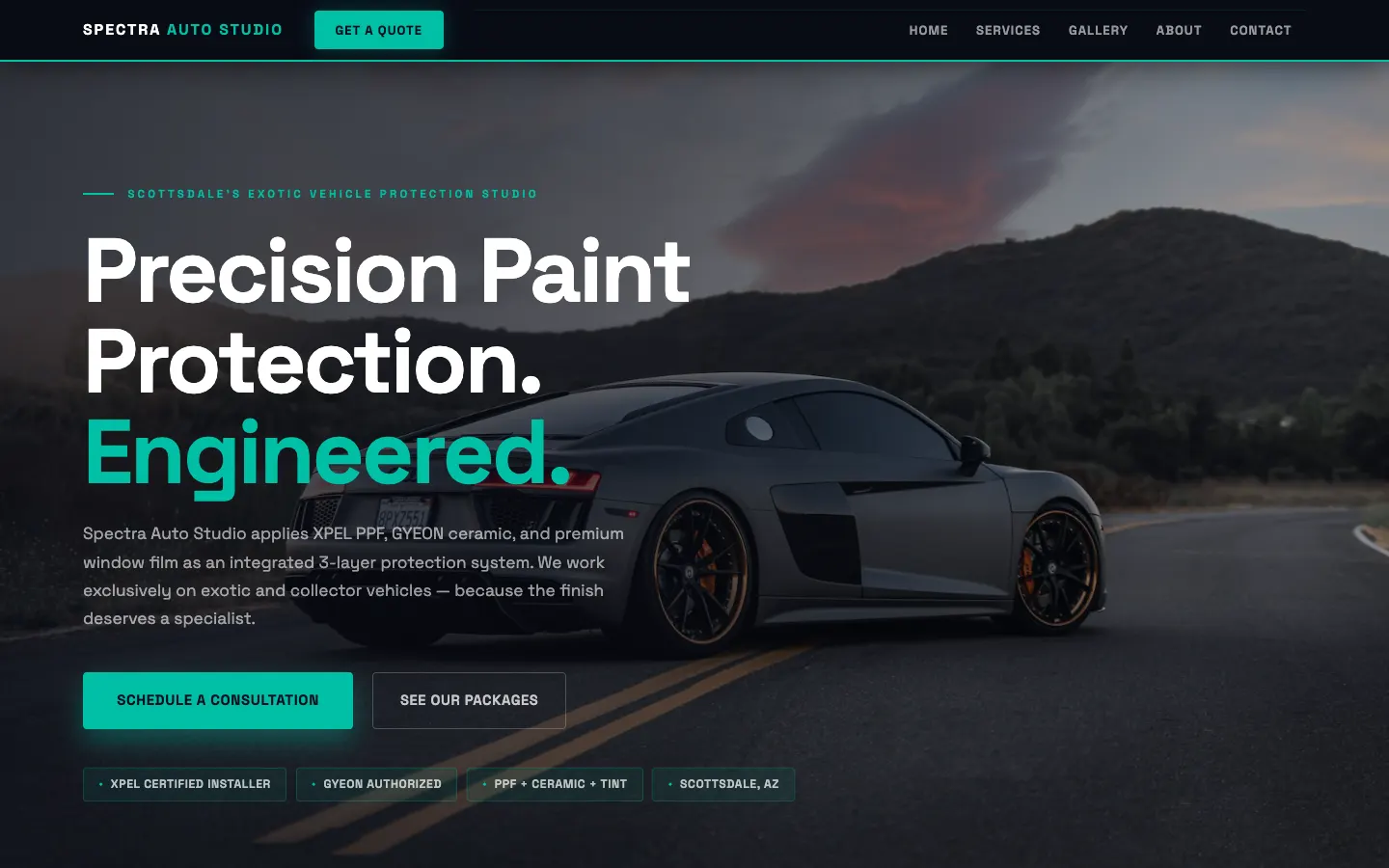
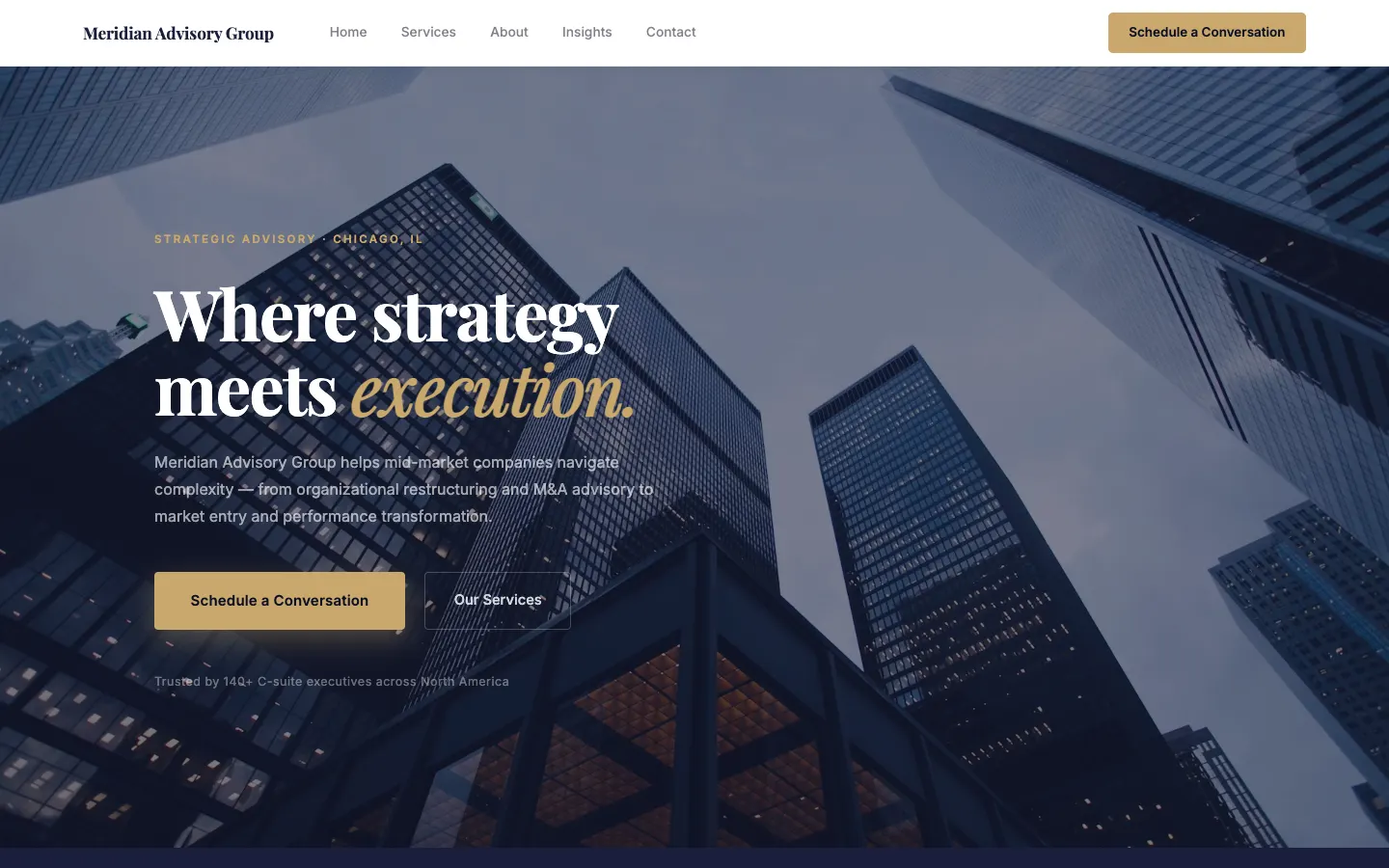
What is Website as a Service?
The name borrows deliberately from SaaS. Twenty years ago, businesses bought software in a box, installed it, and owned the upgrades, patches, and breakage. SaaS replaced that with a subscription: the vendor runs the software, you use it. Website as a Service applies the same shift to your website. Instead of paying thousands for a build and then owning the maintenance (or spending your evenings inside a DIY editor), you subscribe, and the provider owns the work.
A real WaaS subscription bundles four things into one flat fee: the build (design, structure, and initial copy for a professional site), the hosting (servers, SSL, backups, uptime), the platform (the software the site runs on, kept patched and current by the provider), and ongoing updates (a team that makes the changes you ask for: new photos, price changes, new pages, redirects, so the site never goes stale). If a provider only covers some of these, you’re looking at hosting with extra steps, not WaaS.
As the running example on this page: WorkspaceCMS, the WaaS platform built by 1Digital® with a full growth team behind every site, includes all four on every plan. The professional build is free, and plans run $89, $199, $449, or $749 a month flat depending on how many pages are managed and how fast the turnaround is. Most sites go live in days, with full build-out in about 2 to 3 weeks. See how the process works and what each plan costs.
WaaS vs DIY builders, freelancers, and agencies
| DIY builder | Freelancer | Agency retainer | Website as a Service | |
|---|---|---|---|---|
| Upfront cost | $0 | $1,500 to $10,000 | $5,000 to $20,000+ | ✓ Often $0 (the build is bundled) |
| Ongoing cost | ~$10 to $50/mo + your time | Hourly, per change | $500 to $5,000/mo retainer | ✓ One flat monthly fee |
| Who does the work | You | One person (while available) | A team, billed by scope | ✓ The provider’s team, included |
| When something breaks | Your problem | Wait for a reply, pay for the fix | Covered, at retainer rates | ✓ Provider’s problem, covered by the fee |
| Key-person risk | ✗ It’s you | High (pros move on) | Moderate (teams turn over) | ✓ Low (the service, not a person, is accountable) |
| Cost predictability | Good (money) / poor (time) | Poor (every change is a quote) | Fair (scope creep is real) | ✓ Flat and published |
Typical U.S. small-business ranges as of 2026; freelancer and agency pricing varies widely by market and scope. For platform-by-platform detail, see all nine of our comparison pages.
The economics: why the build can be free
The most counterintuitive part of the WaaS model is the free build. Agencies charge thousands for the same work, so how can a subscription service give it away? The answer is the same amortization math behind free phones on carrier contracts. The provider fronts the build cost and recovers it across the first year of the subscription. That’s why nearly every WaaS provider pairs a free build with an initial commitment: WorkspaceCMS, for example, uses a 12-month initial term (the free build is the consideration for it), after which every plan goes month-to-month.
The incentives this creates are the model’s quiet advantage. An agency gets paid the same whether your site performs or not, since the project fee cleared at launch. A WaaS provider only profits if you stay, which means the site has to keep working, the updates have to keep shipping, and the service has to stay worth the fee month after month. A money-back window keeps the provider honest at the start, too:Essentials, Growth, and Premium include a 30-day money-back guarantee, counted from the day we deliver your first design. Ultra and Enterprise are custom builds scoped to the work, so they carry no window after that point: instead we keep revising until you approve the design. On any plan, cancel before we deliver your first design and you get every dollar back, with no time limit. So the commitment never means being trapped at the start.
For the customer, the math is about converted risk. A $10,000 agency build is a bet placed all at once, before you’ve seen the team work. A subscription converts that bet into a predictable operating expense, and moves the ongoing labor (the part DIY builders quietly hand back to you) onto the provider’s payroll instead of your evenings.
What to look for in a WaaS provider
The model is sound; individual providers vary enormously. Four things separate the good ones, and each has a concrete contract question behind it. We’ll use our own terms as the worked example, not because every provider matches them, but because these are the numbers to ask any provider for.
1. Content ownership and export. The deal-breaker question: if I leave, what do I take with me? Some providers hold the site in their account, so cancelling means starting from zero. That’s rent, not service. The right answer is your domain in your name and a real export path. WorkspaceCMS exports all content to JSON and redirects to CSV anytime, no permission needed.
2. Contract terms you can point to. An initial commitment is normal when the build is free (that’s the amortization above), but it should be finite, published, and followed by month-to-month freedom. Ours: 12 months, then cancel anytime, with a 30-day money-back guarantee up front. Walk away from any provider whose term auto-renews annually or whose exit fees aren’t in writing.
3. Turnaround in writing. “Unlimited updates” means little without a clock on it. Ask what they promise: how fast do routine changes ship, and how fast does someone respond when the site is down? WorkspaceCMS publishes turnaround times for every plan (4 business days on Essentials, 2 on Growth, 1 business day on Premium), with faster response targets when your site is down.
4. A precise list of what’s included vs added on. This is where vague marketing hides. Two boundaries matter most. On content: managed updates mean the team implements, formats, and publishes the material you provide. Copywriting is part of the free build at launch, and ongoing writing is a separate Campaign add-on. On search: every WorkspaceCMS site ships with the SEO foundation built in, so Google and AI assistants can understand your business, while ongoing growth campaigns that our team runs are a separate add-on scoped by the strategy team. Any provider who won’t draw these lines in writing will draw them later, in an invoice. (Feature boundaries too: our form builder ships on every plan; appointment booking, with a Google Calendar or Calendly connection, ships on Growth, Premium and Ultra. How large the site may grow is a boundary we publish as well: Essentials covers 10 pages and Growth 25 pages, while Premium and Ultra are uncapped. Blog posts are unlimited on every plan and never count as pages, and nothing is ever billed by the page.)
Who WaaS is right for, and who it isn’t
The model fits service businesses whose website is a lead engine, not a hobby: dentists, HVAC companies, law firms, med spas, contractors, consultancies. If the site’s job is to be found, look credible, and convert, and your job is to run the business, paying one flat fee for someone else to own the website work is usually the highest-leverage trade available. It also fits anyone burned by the freelancer cycle: build, drift, developer disappears, rebuild.
It’s the wrong model for three groups, and an honest provider says so. If you want daily hands-on design control(moving sections, testing layouts, tweaking pixels yourself), the request-queue workflow will frustrate you; a DIY builder or a design tool is a better home (our comparison hub covers nine of them honestly). If you need a fully custom web application (marketplaces, portals, complex ecommerce), that’s development work beyond a website subscription, scoped separately everywhere. And if your only metric is the cheapest possible monthly line item, a $10 builder plan beats any service that includes human labor, provided your time really is free.
For a deeper look at the same trade-offs, see our guides to what a managed website service includes, the best website platforms for local service businesses, and what a website actually costs once DIY time and agency fees are counted. Already have a site? We rebuild it for free and take it over.
Website as a Service: common questions
What does WaaS stand for?
WaaS stands for Website as a Service. It follows the naming pattern of SaaS (Software as a Service): instead of buying a website as a one-time project and then owning all the upkeep, you subscribe to the website as an ongoing service, with build, hosting, software, and updates bundled into one monthly fee.
How much does a website as a service cost?
Most WaaS providers charge between roughly $50 and $500 a month depending on how much human work is included. AI-heavy services start lower; services with a human team on every update cost more. WorkspaceCMS runs $89, $199, $449, or $749 a month flat, with the professional build included free on every plan, plus an Enterprise tier from $999 a month for full custom design work.
Is Website as a Service cheaper than hiring an agency?
Over the first two years, usually yes. A typical small-business agency build runs $5,000 to $20,000 upfront, plus hosting and hourly fees for every change after launch. A WaaS subscription spreads that cost into a predictable monthly fee and includes the ongoing changes, so you never get a surprise invoice for a photo swap or a new service page.
Do I own my website content with a WaaS provider?
It depends on the provider, and it's the single most important contract question to ask. Some providers keep the site in their account, so leaving means starting over. With WorkspaceCMS, you always own your content: your domain stays yours, and you can export all content to JSON and your redirects to CSV anytime.
What's the difference between WaaS and a managed website service?
They're largely the same idea with different labels. 'Managed website service' emphasizes the ongoing operations (a team handling hosting, updates, and maintenance) while 'Website as a Service' emphasizes the subscription pricing model. In practice, a good WaaS provider is a managed website service billed monthly.
Are there contracts with website subscription services?
Usually, and for a structural reason: when the build is free, the provider recovers that cost over the subscription's first year. WorkspaceCMS uses a 12-month initial commitment, then month-to-month (cancel anytime after year one), with a 30-day money-back guarantee so the first month is risk-free.
Does WaaS include SEO and marketing?
Read the fine print. 'SEO' can mean anything from a single settings field to a full campaign. WorkspaceCMS ships every site built so Google and AI assistants can understand your business and show it to the right people, with the technical groundwork handled for you. Ongoing growth campaigns (keyword strategy, content, link building) that our team runs are a separate add-on, and any provider bundling 'free ongoing SEO' into a $100/mo fee deserves skepticism about what that actually buys.
Who is Website as a Service wrong for?
Three groups. People who genuinely enjoy hands-on design control. WaaS trades the drag-and-drop editor for a request queue, and if you want to move pixels yourself daily, a DIY builder will make you happier. Businesses that need a custom web application (booking marketplaces, customer portals, complex ecommerce), which is development work, not a website subscription. And anyone whose only criterion is the lowest possible monthly price: a $10 to $17/mo DIY builder plan will always beat a service that includes human labor.
Curious what a managed site would fix? Check yours.
ChatGPT, Claude, and Perplexity only recommend sites they can read. Most small-business sites fail that test. Scan yours free and see exactly where you stand.
Free · no signup · scores the 15 signals AI uses to find you · ~20 seconds
See the model from the inside.
We build your site for free, get you live in days (full build-out in a few business days), and make every update for you, from $89 a month, flat, with a full growth team ready to bring in new business when you add a growth campaign. 30-day money-back guarantee.