

How AI Is Changing Technical SEO Within Modern CMS Platforms
Five years ago, fixing a Core Web Vitals failure on a 4,000-page ecommerce site was a six-week engineering project. You'd hire a consultant to do log-file analysis, a developer to refactor the image pipeline, and an SEO specialist to argue about which canonicals to set. Today, on a properly architected CMS, the same fix is a four-hour managed-change ticket. That compression is the real story of AI in technical SEO. WorkspaceCMS is built around it. If you want to see what that compression looks like end to end, grab a demo.
This post is for the SEO leads, technical PMs, and growth engineers who already know what hreflang does and have opened Search Console more than once this week. We'll walk through six technical SEO surfaces - Core Web Vitals, crawl budget, structured data, canonicalization, internationalization, and rendering - and show specifically what AI features inside modern CMS platforms now do, and what still requires a human.
Core Web Vitals: from manual profiling to continuous optimization
The Core Web Vitals targets haven't moved: LCP under 2.5s, INP under 200ms, CLS under 0.1. What's changed is how a CMS gets you there.
LCP - the image pipeline does the heavy lifting
The largest contentful paint element is almost always a hero image or above-fold media. WorkspaceCMS's image pipeline auto-converts uploads to AVIF and WebP, serves the appropriate format based on the browser's Accept header, generates responsive srcsets for six breakpoints, and prefetches above-fold images. The CMS knows which images are above-fold from the page template, so the prefetch decisions don't need human input.
What's still on you: choosing hero images that aren't 8MB to begin with, and writing alt text that's actually descriptive (the Alt-Tag Sweep handles the latter on legacy images, but new uploads should still get an editor's eye).
INP - interaction responsiveness
INP replaced FID in 2024 and it's a harder metric to hit because it measures the worst interaction, not the first. Modern CMS architectures help by deferring third-party scripts, chunking JavaScript at the route level, and isolating heavy DOM manipulation from the main thread. The Site Audit in WorkspaceCMS flags long-task scripts on every audit run and the managed-change team can swap them for lighter alternatives or defer them.
CLS - layout stability
CLS issues come from images without dimensions, dynamically injected ads, and web fonts that swap. WorkspaceCMS enforces width and height attributes on every image, uses font-display: optional with size-adjust for web fonts, and reserves layout space for any deferred content. CLS regressions show up in the Site Audit before they hit production.

Crawl budget: log-file analysis without the consultant
For sites under 10,000 pages, crawl budget rarely matters. For larger sites - enterprise ecommerce, news, marketplaces - it's a constant battle. Googlebot allocates a finite crawl budget and you want it spent on the pages that move revenue.
Historically, this meant exporting Apache or Nginx logs, running them through a tool like Screaming Frog Log File Analyser or Botify, and producing a report on which URLs Googlebot was wasting budget on. AI-native CMS platforms have moved this in-platform. WorkspaceCMS's crawl analytics surface:
- Pages Googlebot crawled in the last 30 days that don't get any organic traffic - candidates for noindex or removal.
- Pages Googlebot crawls more often than necessary (faceted filter URLs, paginated listings beyond page 5) - candidates for robots.txt disallow or canonicalization.
- High-value pages Googlebot hasn't crawled in 60+ days - usually a sign of weak internal linking.
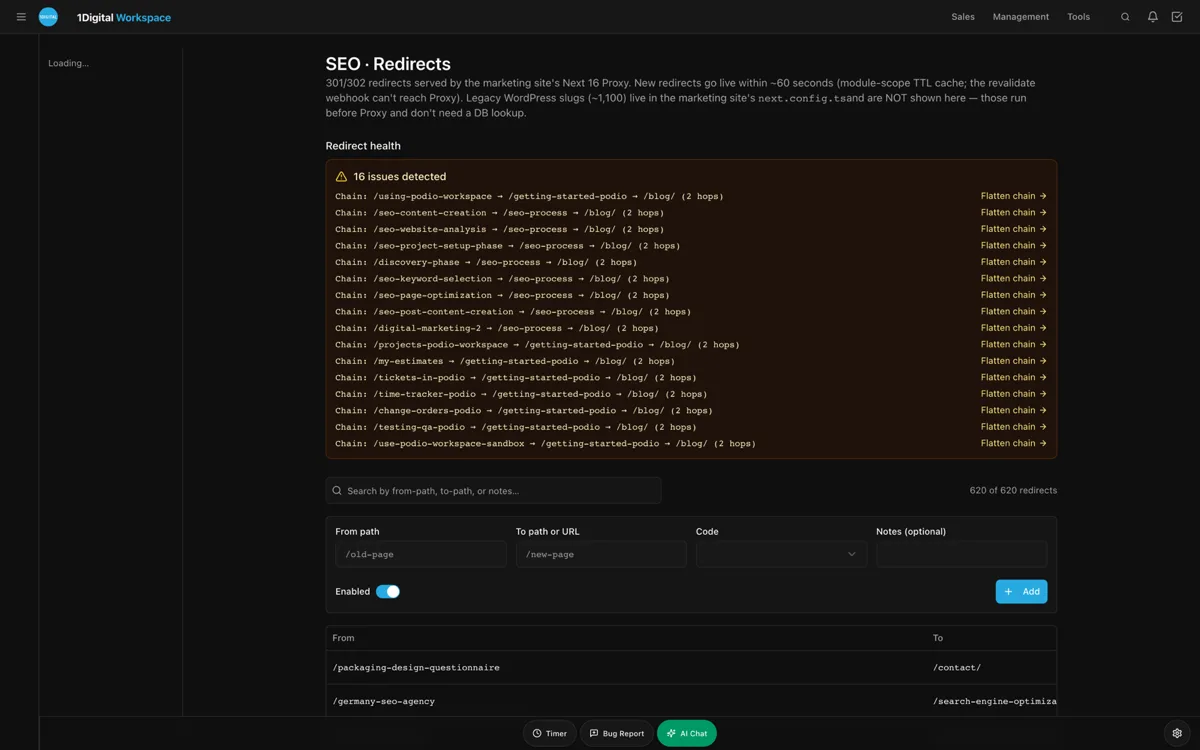
- Crawl errors - 404s, 500s, redirect chains - flagged with the referring page so they're actually fixable.
The Internal-Link Rules engine then redistributes link equity to under-crawled high-value pages on the next publish. What used to be a quarterly consulting engagement now runs as an always-on system.
Structured data: schema you can actually trust
The JSON-LD specification grew from a niche convenience to the foundation of how Google understands page content. Pages with proper Article, Product, FAQ, BreadcrumbList, HowTo, and Organization schema show up in rich results, knowledge panels, and AI Overviews. Pages without it are flying blind.
The historical pain point: schema gets written once when a developer ships the template, then nobody updates it as the page evolves. By month six, the schema and the content are out of sync, and Google's structured data validator is throwing warnings.
The AI CMS approach: schema is generated from the page template's data model on every save. If the product price changes, the Offer schema updates automatically. If a FAQ section is added, the FAQPage schema regenerates. The JSON-LD Editor surfaces the current schema in a syntax-highlighted view so an editor can verify it without copying it into Google's validator.
Canonicalization: the silent killer
About 40% of the technical SEO audits we do find broken canonicalization as a top-three issue. Self-canonicals missing on some pages, contradictory canonicals from sitemap to HTML, parameterized URLs canonicalizing to themselves instead of the parent. The damage is usually invisible until impressions tank.
What an AI CMS does here:
- Auto-generates self-canonicals on every page using the resolved final URL after redirects.
- Detects and flags parameter handling issues - UTM parameters should canonicalize to the parameter-stripped URL, faceted filter parameters should canonicalize to the parent category.
- Validates sitemap URLs against canonical tags on the rendered HTML. Mismatches get flagged in the Site Audit.
- Detects redirect chains of 2+ hops and flags them for cleanup.
UNLIMITED MANAGED CHANGES
Send a ticket. We ship the change.
Every WorkspaceCMS plan includes unlimited managed CMS edits. Essentials ships in 4 business days. Growth ships in 2. Premium ships in 12–24 hours. Describe what you need and our team builds it on your live site.
Hreflang and internationalization
For multi-locale sites, hreflang implementation is where a lot of technical SEO programs go to die. The spec is finicky - bidirectional references required, x-default handling, locale codes that match Google's expectations, sitemap-level vs HTML-level implementation.
WorkspaceCMS's locale model treats each locale as a first-class page variant. Hreflang tags get generated automatically across all variants on every publish, with bidirectional consistency enforced. The Site Audit flags missing locale pages, incorrect language codes, and broken hreflang clusters. The managed-change workflow lets a non-developer correct locale-specific issues without touching a config file.
IndexNow and proactive indexation
IndexNow is the protocol Bing and Yandex use for proactive URL submission. Sites that ping IndexNow on publish see indexation latency drop from days to minutes on those engines. Google doesn't support IndexNow but does respect Search Console webhooks and sitemap lastmod updates.
WorkspaceCMS fires IndexNow pings on every publish, updates Search Console via API, regenerates the sitemap with proper lastmod timestamps, and updates llms.txt for LLM crawlers. The whole pipeline runs in under 30 seconds after Publish.
JavaScript rendering and the JS SEO tax
Single-page apps and client-rendered sites are still indexable, but Google's render queue treats them differently from server-rendered pages - slower, less complete, more prone to errors. Sites that need to rank competitively should be server-rendered or static-generated for SEO surface area.
WorkspaceCMS renders all content surfaces server-side by default. Interactive components hydrate client-side but the SEO-critical content - text, images, schema, links - is in the initial HTML response. The Site Audit includes a "rendered HTML vs static HTML" diff that surfaces any content gap between the two, which is the failure mode most JS-heavy sites hit.
Sitemap segmentation for large sites
The default sitemap-per-site approach falls apart past about 50,000 URLs. Google's sitemap limit is 50,000 URLs or 50MB per file, but practical crawl efficiency suffers well before that. Segmenting by content type - product sitemap, category sitemap, content sitemap, location sitemap - lets Google prioritize crawl budget and gives you per-segment lastmod signals.
WorkspaceCMS handles segmentation automatically based on content type and ships a sitemap index file at the root. Each segment regenerates independently on publish, so a product update doesn't invalidate the content sitemap and vice versa. For sites over 10,000 URLs, this is the difference between Google crawling your priority pages weekly versus monthly.
Structured data testing in CI
One pattern we've seen mature this year: treating schema validation as a CI concern, not a launch-day concern. WorkspaceCMS runs schema validation on every save and blocks publish if any required fields are missing or malformed. Optional warnings (a Product without GTIN, an Article without datePublished) are surfaced but don't block.
The win here is preventing rich-result loss before it happens. The historical pattern: an editor changes a product template, schema breaks silently, Google removes the rich snippet two weeks later, CTR drops 25% on the affected pages, nobody notices for a month. Continuous validation catches this on the editor's screen.
The workflow compression, by role
Putting it all together, here's what's changed for each role:
Technical SEO consultant
Used to: audit, identify issues, write tickets, follow up over weeks. Now: spends time on the actual judgment calls - entity strategy, competitive analysis, edge-case crawl issues - because the mechanical fixes are running continuously.
Frontend developer
Used to: implement schema, fix Core Web Vitals, ship redirects. Now: ships product features, because the SEO infrastructure is part of the CMS, not part of the codebase.
SEO program manager
Used to: chase tickets, manage tool subscriptions, reconcile data from five tools. Now: runs a single dashboard, ships managed-change tickets for one-off needs, and spends Friday on strategy rather than reporting.
What still needs a human
The compression is real. The honest counterpoint: a few things still require senior judgment.
- Site architecture decisions. Hub-and-spoke vs flat, faceted nav strategy, category taxonomy - these are business decisions an AI shouldn't make alone.
- Migration strategy. The redirect map for a re-platform, the slug schema for a new site, the canonical strategy for international expansion - humans set these, the CMS executes them.
- Edge-case debugging. When Search Console shows a weird error pattern that doesn't match any known issue, you still want a senior person looking at it.
The Premium plan at $449/month includes daily Site Audit, 12-24-hour managed-change SLA, and 4-hour SLA on blockers - which covers the third bullet through the managed-change team rather than an external consultant.
How AI Is Changing Technical SEO Within Modern CMS Platforms FAQ
Can I keep Screaming Frog if I'm on WorkspaceCMS?
You can, and some teams do for spot audits. The continuous Site Audit covers the recurring needs, so the Screaming Frog license tends to get downgraded or dropped over time.
Does WorkspaceCMS work with headless commerce backends?
Yes. The headless integration connects to Shopify, BigCommerce, and custom backends via API. The SEO surface lives in WorkspaceCMS; the commerce surface lives where you put it.
How does the AI Visibility Tracker handle paywalled or gated content?
LLMs can't see gated content unless the publisher exposes it through a specific channel. The tracker reports what's actually being cited, not what could be.
What's the minimum site size where this stack pays off?
About 50 pages. Below that, you can probably manage with WordPress + Yoast and a single SEO contractor. Above that, the workflow compression starts paying back inside 60 days.
Is server-side rendering required, or can I keep my SPA?
SPAs work for app-style surfaces (logged-in dashboards, etc.). Marketing pages should be SSR or static. WorkspaceCMS serves both modes - SSR for content surfaces, SPA-style hydration for interactive elements.
Wrap-up
Technical SEO didn't get easier in 2026. It got compressed. The same work still happens - it just happens automatically, continuously, and inside the CMS instead of across five tools and three vendors. If you want to see that compression run against your stack, reach out or browse our live demos.

Get your AI visibility audited.
We run a live audit of your site, PageSpeed, llms.txt, and AI visibility score, then tell you exactly what to fix.
Want the full picture? Browse more posts