
BLOG AUTOMATION · PREMIUM & ULTRA

Your blog, researched, written and scheduled.
You just approve.

Autopilot learns how you sound, studies the competitor blogs you pick, and writes SEO-ready articles on the schedule you set. With the Review Gate, you decide: approve every article before it goes live, or let it run hands-free.

  • Written in your brand voice
  • Topics from competitors you choose
  • Review Gate: approve every post, or go hands-free
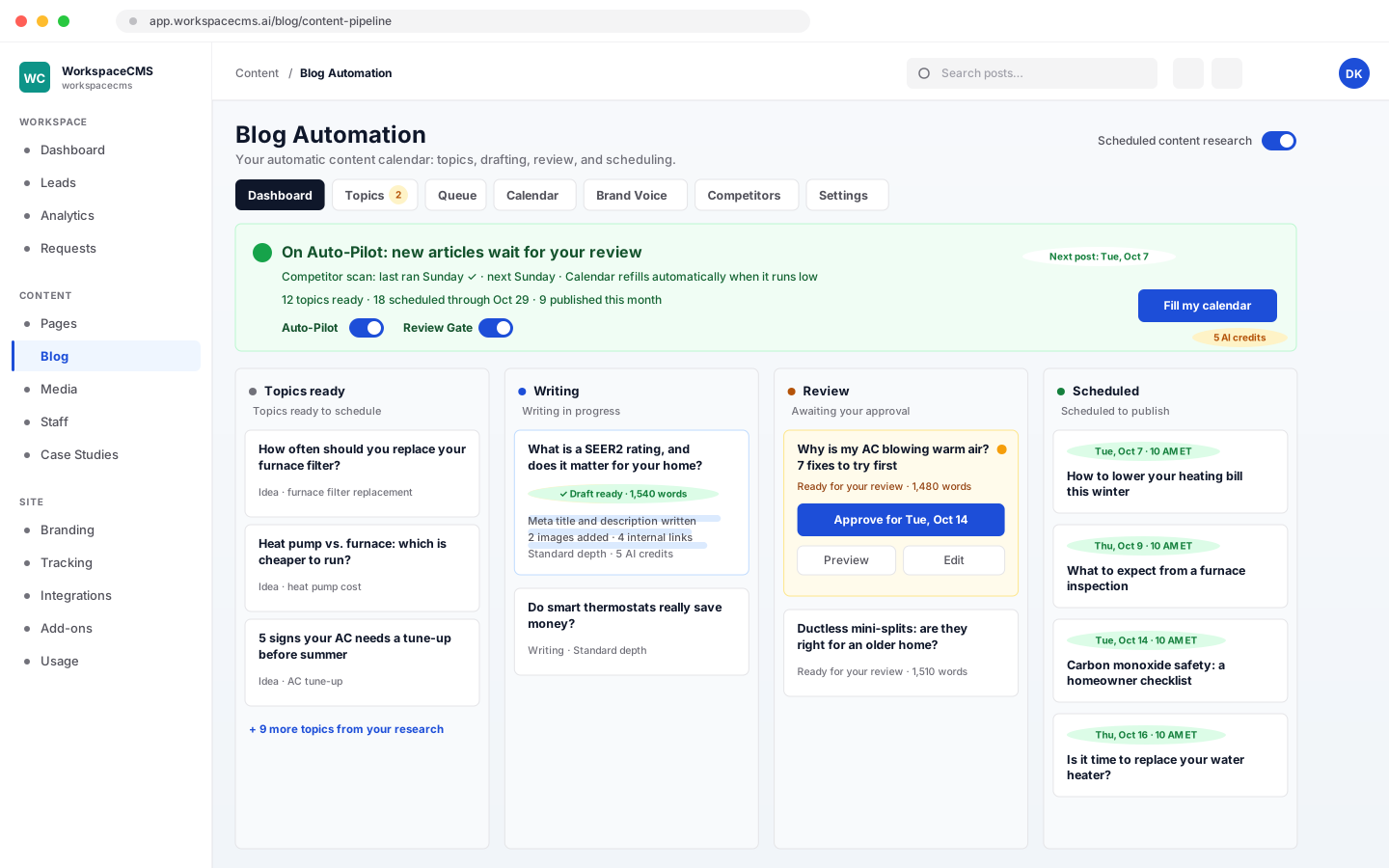
The Blog Automation board in the WorkspaceCMS dashboard
How it works

Set it up once. The blog keeps itself going.

  1. Tell it how you sound

    Pick your tone and who you write for. It can fill this in from your website for you.

  2. Pick blogs to learn from

    Choose the competitor blogs to watch, or let AI suggest them for you to approve.

  3. Set your pace

    Every day, business days, a few a week or a few a month, at the time you choose.

  4. Approve, or go hands-free

    With the Review Gate on, finished articles wait for your OK. Switch it off and they publish on their own.

Step 1 · Brand Voice

It writes like you, not like a robot.

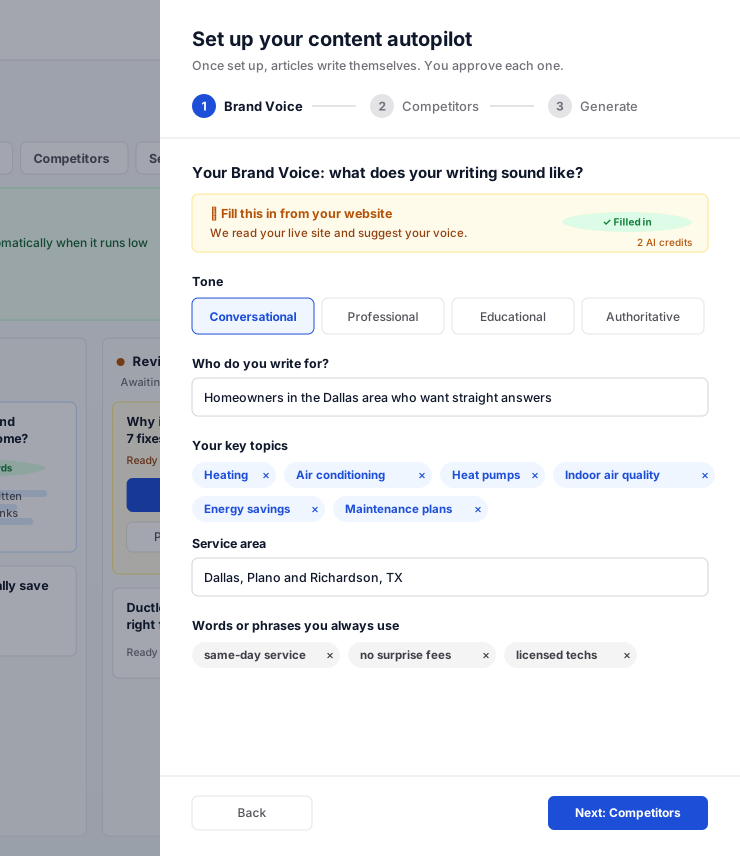
Before it writes a word, Autopilot learns how your business talks. Every article it drafts uses that voice: the tone, the words you always use, and the people you are writing for.

  • Choose a tone: conversational, professional, educational or authoritative.
  • Tell it who you write for and the topics you are known for.
  • Add your service area, so articles speak to your local customers.
  • List the words and phrases you always use, like “same-day service”.
  • Short on time? It can read your website and fill this in for you (2 AI credits).
Autopilot setup, step 1: Brand Voice
Step 2 · Competitors

It studies your competitors, so you don't have to.

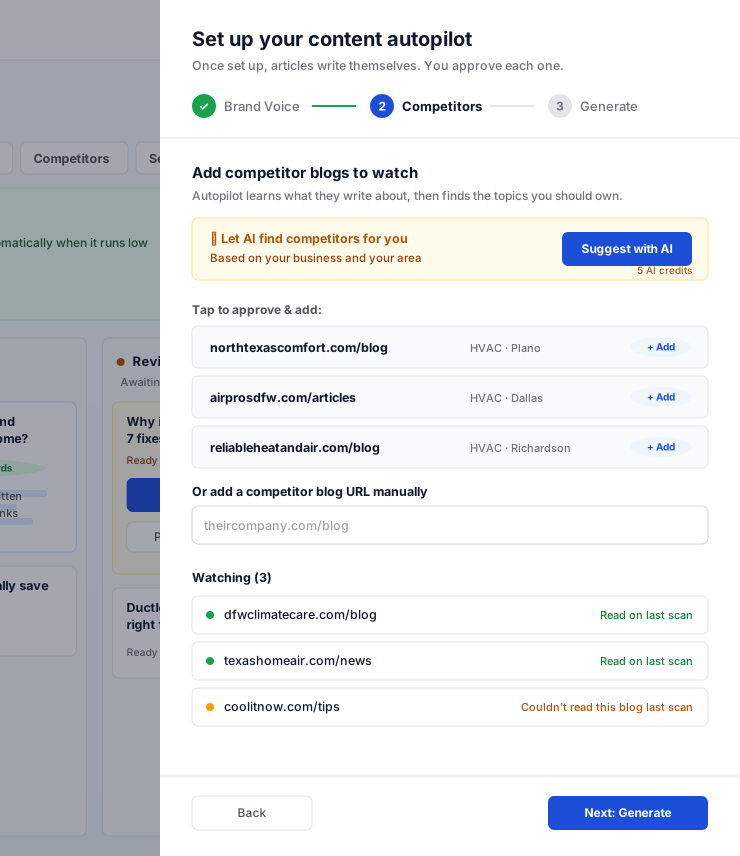
Pick the competitor blogs you want to keep up with. Autopilot reads what they publish, groups it into topics, and finds the ones worth writing about for your business.

  • Let AI suggest competitors in your area, then approve the ones you want (5 AI credits). Or paste any blog address.
  • Their blogs are checked again every week, so new ideas keep coming.
  • Connected Google Search Console? It also uses how your own pages perform in search.
  • Topics that don't fit your business are filtered out.
  • If a competitor's blog can't be read, it tells you, so you can swap it.
Autopilot setup, step 2: competitor blogs to watch
Step 3 · Your schedule

You set the pace. It keeps the calendar full.

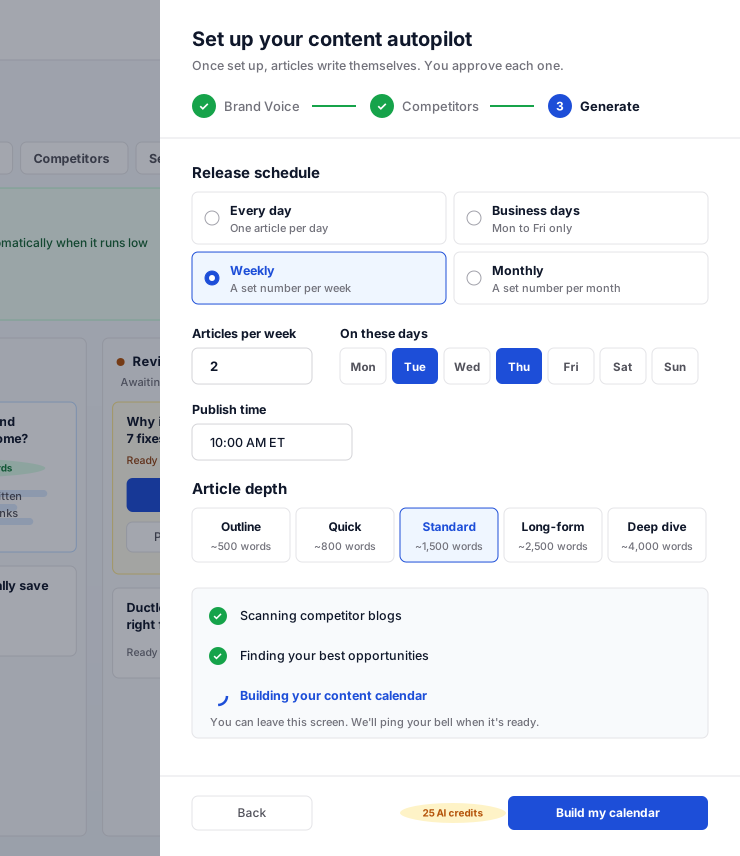
Choose how often you want new articles and how long they should be. Autopilot plans up to 90 days of posts ahead, writes each one about a month before it goes live, and tops the calendar up by itself whenever fewer than two weeks are left.

  • Every day, business days only, 1 to 7 a week on the days you pick, or 1 to 31 a month.
  • Pick the time articles go live (Eastern time).
  • Choose the depth: from quick 500-word tips to 4,000-word deep dives.
  • Walk away while it sets up. Your dashboard bell tells you when the calendar is ready.
Autopilot setup, step 3: release schedule, article depth and Build my calendar
The board

Every article, from idea to published, on one board.

See exactly where each article is: topics ready to go, being written, waiting for you, and scheduled to publish. No spreadsheets, no chasing a writer.

  • Four columns: Topics ready, Writing, Review, and Scheduled.
  • Add your own topic ideas any time, or ask AI for more.
  • Move a date, skip a post, or publish one early.
  • One switch pauses Autopilot. Another pauses the competitor research.
The Blog Automation board in the WorkspaceCMS dashboard
Every article, ready to publish

Finished, polished, and waiting for your OK.

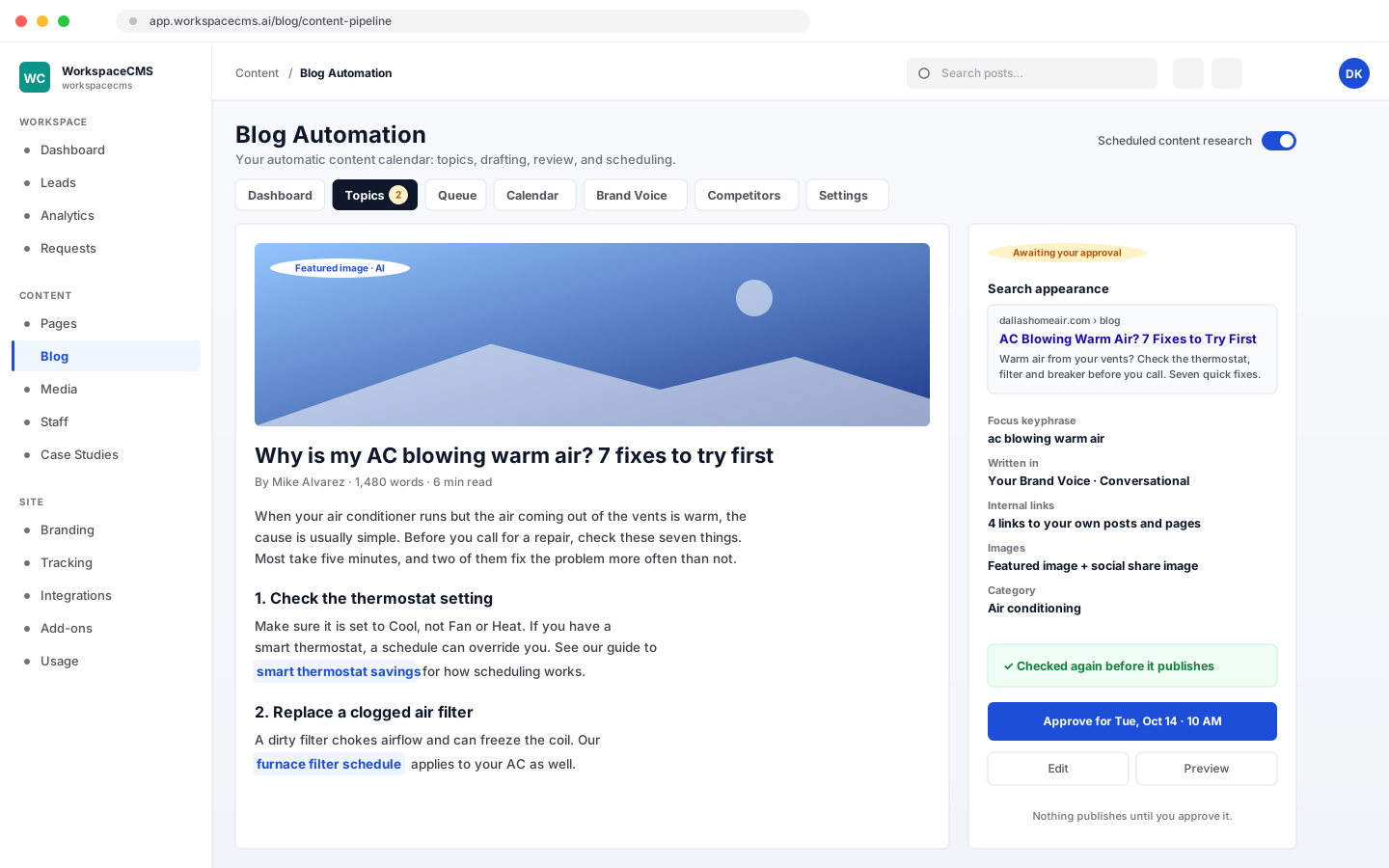
Each article arrives ready to go live, not as a rough draft. With the Review Gate on, read it, edit anything you like, then approve it for its date.

  • SEO title, meta description and focus keyphrase, already filled in.
  • A featured image and a social share image, made for the article.
  • Links to your own pages and posts, so readers keep exploring your site.
  • Links the AI invented are removed, so readers never land on a broken page.
  • Articles that come out too short are rewritten or held back, and each post is checked again as it publishes.
An Autopilot article waiting for approval, with its SEO fields and images
The Review Gate · included

Approve every post, or let it run on its own.

The Review Gate is one switch, included with Blog Automation on Premium and Ultra. Start with it on, and switch it off once you trust the writing. You can change it any time.

Review Gate on

You approve every article

Finished articles wait in Review. Nothing goes live until you say so.

  • Read, edit or reword anything before it publishes.
  • Approve it for its date with one click.
  • A reminder email if articles wait more than two days.
Review Gate off

Fully hands-free

Finished articles go straight onto the calendar and publish on their dates.

  • Your blog keeps going with nothing to do.
  • A weekly summary shows what was written and published.
  • Switch the Review Gate back on whenever you like.
It keeps you posted

Stay in the loop without logging in.

A weekly summary

Every Sunday: what was written, what needs your review and what published. No email in a quiet week.

A nudge when articles wait

If finished articles sit in Review for two days, you get a reminder with a button to approve them.

A heads-up before it runs dry

Set a low-queue alert and you're emailed when scheduled posts drop below your number.

What it costs to run

Paid for with the AI credits in your plan.

Setup is 25 credits. After that, each article uses credits by length, plus 4 for its two images. A Standard article with its images is 9 credits. Premium includes 1,200 credits every month, and Ultra 1,600.

Outline~500 words2 credits
Quick~800 words3 credits
Standard~1,500 words5 credits
Long-form~2,500 words8 credits
Deep dive~4,000 words13 credits

The competitor research that keeps new topics coming also uses credits each time it runs. See what every AI action costs.

Premium vs Growth

On Growth, you write the blog. On Premium, it writes itself.

Growth gives you an AI helper for the posts you plan yourself. Premium adds the whole engine: the research, the calendar, your brand voice, and 3 times the AI credits to run it.

FeatureGrowthPremiumUltra
Blog Automation (Autopilot)Not includedIncludedIncluded
Competitor research that finds your topicsNot includedIncludedIncluded
Articles written in your Brand VoiceNot includedIncludedIncluded
A content calendar that refills itselfNot includedIncludedIncluded
Review Gate: approve every post, or go hands-freeNot includedIncludedIncluded
AI draft from a brief you writeIncludedIncludedIncluded
AI credits a month4001,2001,600
Price$199/mo$449/mo$749/mo
FAQ

Blog Autopilot questions,
answered.

Will anything publish without me seeing it?

Not while the Review Gate is on. Every finished article waits in Review until you approve it. If you would rather it ran fully hands-free, you can turn the Review Gate off, and you can pause Autopilot altogether with one switch.

Does it copy my competitors?

No. It looks at what your competitors publish to understand which topics matter in your industry, then writes its own articles in your brand voice. Watching their blogs is how it finds ideas, not text to reuse.

Can I edit an article before it goes out?

Yes. Open any article, change what you like, and approve it when you are happy. You can also add your own topic ideas, move a date, skip a post, or publish one early.

How many articles will it write?

As many as your schedule asks for: one a day, business days only, 1 to 7 a week, or 1 to 31 a month. Each article uses AI credits from your plan's monthly allowance, so your schedule and article length decide how far your credits go.

What do the AI credits pay for?

The first setup is 25 credits (studying competitors, finding topics and building the calendar). After that, each article costs 2 to 13 credits depending on its length, plus 4 for its two images. Premium includes 1,200 credits a month and Ultra 1,600.

I'm on Growth. What do I get?

On Growth you can have AI draft a post from a brief you write, then edit and publish it yourself. Blog Automation, competitor research and Brand Voice come with Premium and Ultra.

Blog Automation is on Premium and Ultra

Stop staring at an empty blog.
Let Autopilot keep it going.

Sign up online and we build your site for you. Blog Automation comes with Premium and Ultra.

Want to see every tool first? browse the tools