
AI VISIBILITY TRACKER · PREMIUM & ULTRA

Does ChatGPT recommend your business?
Now you will know.

Every month the AI Visibility Tracker asks ChatGPT, Claude, Perplexity, Gemini, and Google AI Overviews the questions your customers ask, then shows whether they named you, who they named instead, and which websites they cited.

  • Checks five AI assistants every month
  • See which competitors AI names instead
  • Read every answer and every source
Cannabis CPA Systems website, built by WorkspaceCMS
Monthly scan finishedYour score vs your previous scan
Named instead of youSee which competitor, and where
Full-screen view
How it works

Set it up in a few minutes. It checks every month.

A short setup wizard gets you tracking. After that the scan runs on its own in the first week of each month. Press Scan now any time, and your dashboard tells you when the results are ready.

  1. Tell it who you are

    Your business name, website and industry. Your name and website are filled in for you.

  2. Name your competitors

    Add up to five businesses your customers compare you with. You can add or remove them later.

  3. Pick the questions

    Tick from starter questions for your industry, or type the ones your customers really ask.

  4. Read the results

    Each month the tracker asks every engine your questions and shows who got named, and who got cited.

Inside the tracker

What AI says about you, month after month.

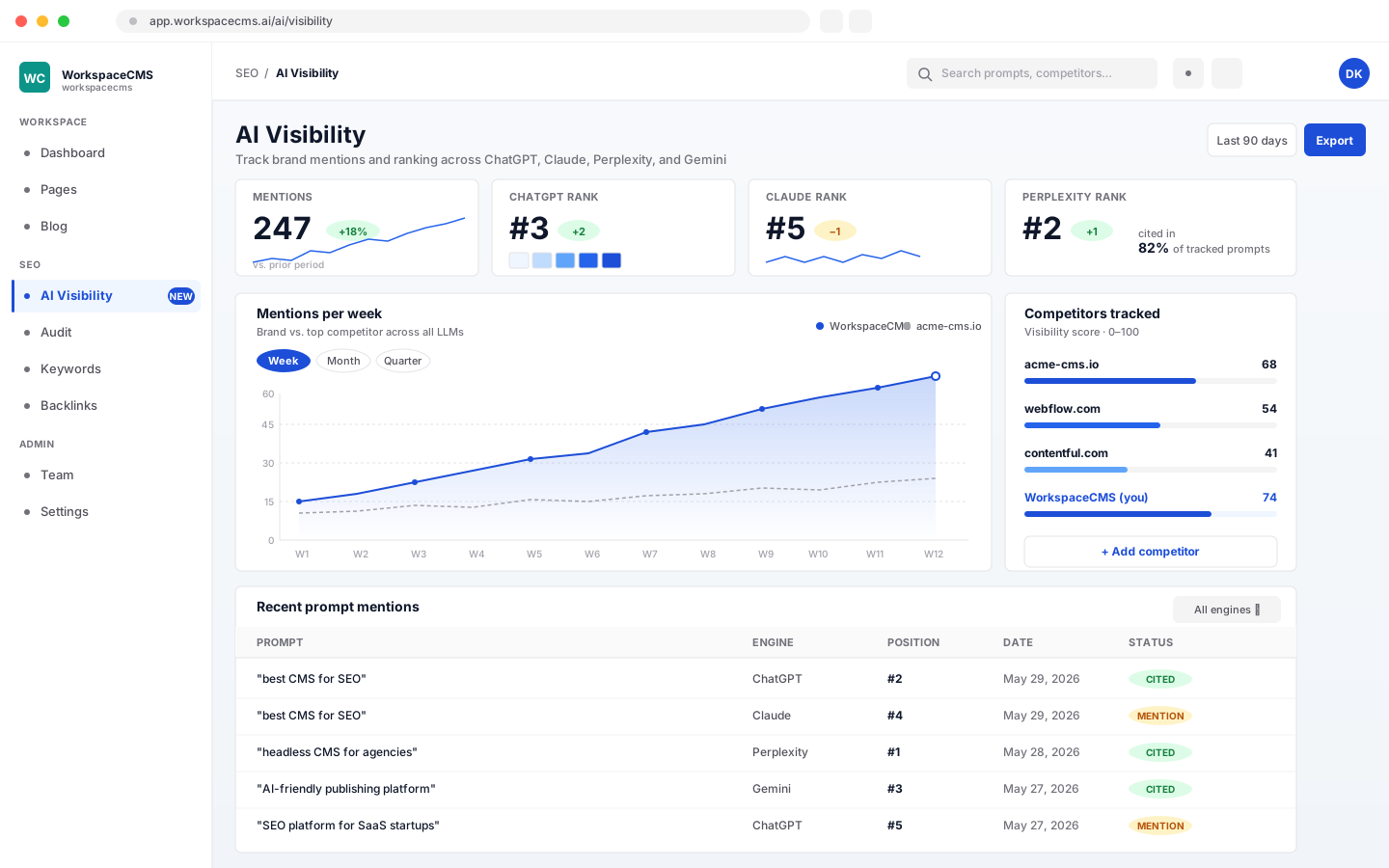
The AI Visibility Tracker dashboard in WorkspaceCMS
Your scorecard

One score, and whether it went up or down.

The dashboard opens on your AI Visibility Score, with a letter grade, and how much it moved since your previous scan. Under it, short plain-English notes explain what changed.

  • Mention share: how often AI answers name your business.
  • Citation share: how often they link to your website as a source.
  • Where you appear in the answer counts toward the score too.
  • Recommendations when the numbers are low, in plain words.
Competitor standing

See who AI recommends instead of you.

Your business and the competitors you track sit side by side, ranked by how often they get named. A scan history table shows the same numbers scan after scan, so you can see who is gaining ground.

  • Add a competitor by name, with their website if you know it.
  • Your own row is marked, so you can find it at a glance.
  • Remove a competitor any time. Their past numbers stay in your history.
Engine by engine

Which assistants know you, and which ignore you.

The AI Platform Breakdown splits your results across ChatGPT, Claude, Perplexity, Gemini, and Google AI Overviews. One engine can love you while another never mentions you. Now you can tell which.

  • Mention and citation rates for each engine.
  • Switch any engine off in Settings if you do not want it checked.
The real answers

Read exactly what each AI said.

Numbers tell you where you stand. The Responses page tells you why. Open any question and read each engine's full answer, with the links it used as sources.

  • Filter to one question to compare every engine's answer to it.
  • See the sites AI trusts for your topic, so you know what to study.
  • Each answer shows which engine gave it and when.
Reports and controls

Share it, print it, keep it clean.

A monthly report email

Switch it on and get a summary after each scan: your mention share and how it moved, your citation share, competitor share and the top cited links.

A link you can share

Owners can create a read-only link to the dashboard for a partner or colleague. It shows current data and expires after 30 days.

Export to PDF

Print the dashboard as a clean report whenever you need one for a meeting.

A stoplist for noise

Tell it to ignore a brand or a website, like a directory or a review site, so your standings only show real competitors. It suggests the names that show up most.

The other half

Tracking tells you where you stand. Your site does the rest.

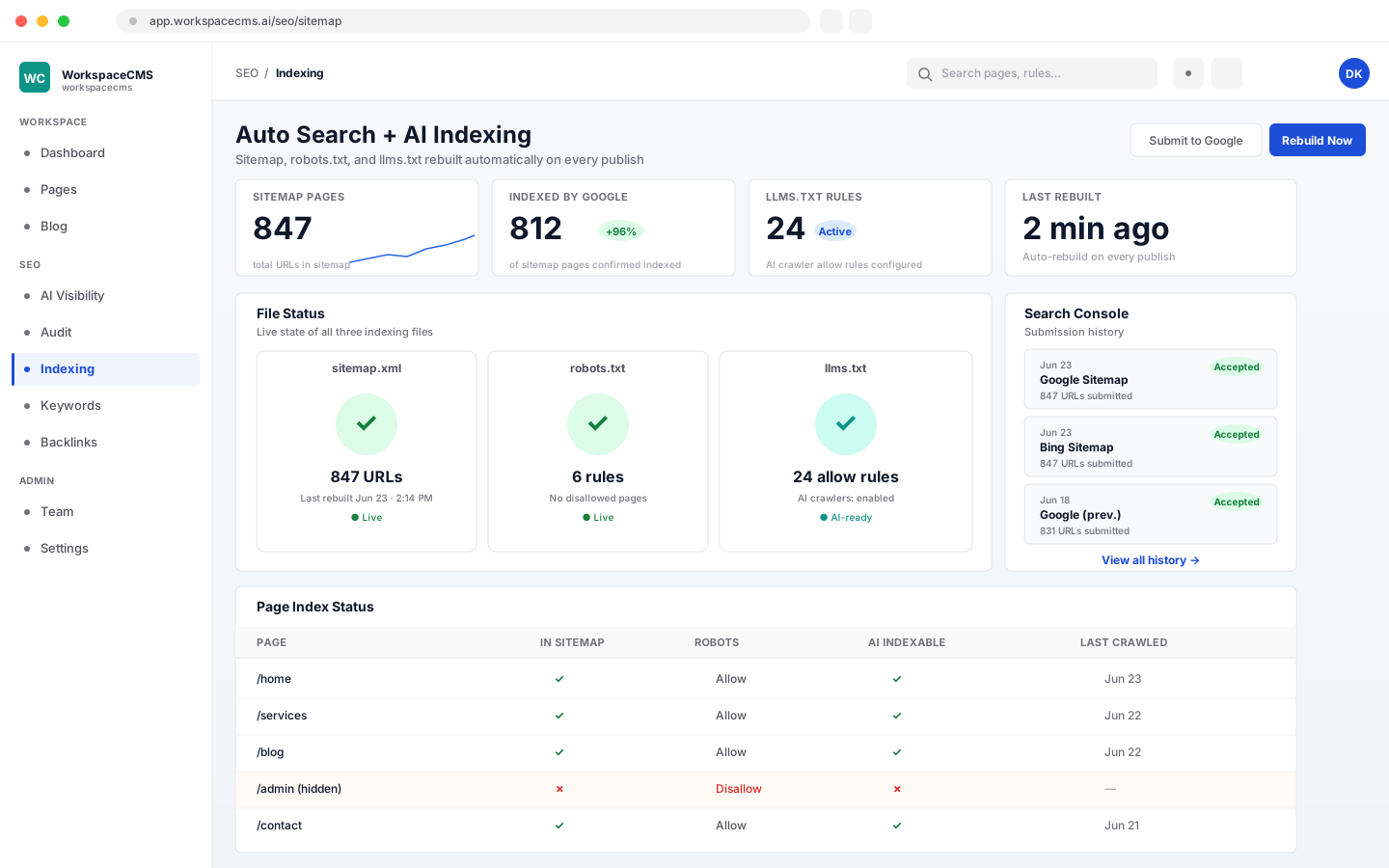
The tracker is a monitoring tool, not a promise. What AI assistants say depends on what they can find and read about you. Every WorkspaceCMS site ships the technical basics they rely on: structured data, a sitemap that rebuilds itself when you publish, and robots.txt and llms.txt files you can edit without code.

See the SEO and AI search tools

Sitemap, robots.txt and llms.txt controls in the WorkspaceCMS dashboard
Free, no sign-up

Not sure yet? Run the free AI visibility check.

Enter your website and see whether AI assistants can read it and the signals they look for. It is a one-off check of your site. The tracker is what asks the assistants themselves, every month.

Run the free check →
Which plans include it

The AI Visibility Tracker comes with Premium and Ultra.

One scan a month is included and uses none of your AI credits. Extra scans use 25 AI credits each, only when they finish with results, up to 3 scans a day.

FeatureGrowthPremiumUltra
AI Visibility TrackerNot includedIncludedIncluded
Scan included each monthNot includedOne scan a monthOne scan a month
Questions you can trackNot includedUp to 30Up to 30
Extra scansNot included25 AI credits each25 AI credits each
Sitemap, robots.txt and llms.txt you controlIncludedIncludedIncluded
AI credits a month4001,2001,600
Price$199/mo$449/mo$749/mo

Essentials does not include the tracker. Compare every plan, or see what every AI action costs.

FAQ

AI visibility questions,
answered.

Will this get ChatGPT to recommend my business?

No tool can promise that, and this one does not try. The tracker shows you where you stand: whether each AI names you, who it names instead, and which sites it trusts. What you do with that is up to you. Every WorkspaceCMS site does ship the technical basics AI assistants read, like structured data, an automatic sitemap and an llms.txt you can edit.

Which AI assistants does it check?

ChatGPT, Claude, Perplexity, Gemini, and Google AI Overviews. You can switch any of them off in Settings.

How often does it scan?

One scan a month is included, run automatically in the first week of the month. You can also press Scan now. Whichever scan comes first in a month is the included one. Any scan after that is an extra scan and uses 25 AI credits, charged only if it finishes with results. You can start up to 3 scans a day.

What questions should I track?

The ones a customer would type before choosing a business like yours, such as "who is the best plumber near me?" Setup suggests starter questions for your industry, and you can add your own. You can track up to 30 and pause any question without deleting it.

Why did my numbers change when I did nothing?

AI assistants write a fresh answer every time they are asked, so small moves between scans are normal. Watch the direction over several months rather than a single scan.

Is this a managed service? Will someone improve it for me?

No. It is a monitoring tool you check yourself in your dashboard. Nobody on our side works on your AI visibility as part of the plan.

What is the difference between this and the free AI visibility check?

The free check is a one-off scan of your website: it looks at whether AI assistants can read it and the signals they use. The tracker asks the AI assistants themselves, every month, and records what they actually say about you and your competitors.

I'm on Growth. Can I get it?

The AI Visibility Tracker comes with Premium and Ultra. Growth and Essentials include the technical foundation: an automatic sitemap and robots.txt and llms.txt files you can edit.

The AI Visibility Tracker is on Premium and Ultra

Stop guessing what AI says about you.
Check it every month.

Sign up online and we build your site for you. The AI Visibility Tracker comes with Premium and Ultra.

Want to see every tool first? browse the tools