See which ads make your phone ring. And which calls were real leads.
Give every ad and source its own tracking number. Calls ring your real phone, get recorded and transcribed, and AI sorts the leads from the wrong numbers. It lives in the same dashboard as your website, as an add-on on every plan from $25/mo.
Set it up once. Every call tells you where it came from.
1
Add it from your dashboard
Open Phone Leads, pick how many tracking numbers you need, and it is added to your existing WorkspaceCMS bill.
2
Pick your numbers
Search by area code for local US numbers, and label each one with where it will run: Website, Google Ads, Facebook, a flyer.
3
Calls ring your real phone
Every call to a tracking number is forwarded to your business line. You answer the way you always do.
4
See what every call was worth
Each call shows up with its source, a recording, a transcript, and an AI verdict: lead, not a lead, or unreviewed.
What you get
Call tracking for small business, without another subscription.
Know which marketing is worth paying for, and never lose track of a caller.
Which ads make the phone ring
A number for every source.
Up to 5 tracking numbers, each with a label like Website, Google Ads or Facebook.
Every call record carries its source, so you can filter calls by where they came from.
On your WorkspaceCMS site, the click-to-call phone numbers switch to the right tracking number for how the visitor arrived.
Running a site somewhere else? Paste one snippet on WordPress, Shopify, BigCommerce and more to do the same.
Recordings and transcripts
Hear it, or just read it.
Every call is recorded, and you can play it back right in your dashboard.
A written transcript appears a few minutes after the call ends.
Callers hear a short notice that the call may be recorded before it connects.
Each call shows the caller's number, how long it lasted, and whether they are a new or returning caller.
AI sorts the calls
Real leads, separated from the noise.
AI reads each transcript and marks the call as a lead, not a lead, or unreviewed.
Leads are callers asking about your services, prices or availability. Wrong numbers, sales pitches and robocalls are not.
Calls too short or unclear to judge stay unreviewed rather than getting a guess.
Each AI sort uses 1 AI credit from your plan's monthly AI credits.
Missed calls
A missed call is not a lost call.
A call nobody picks up is still logged as Missed, with the caller's number and the time.
You get an email about it within minutes, so you can call them back.
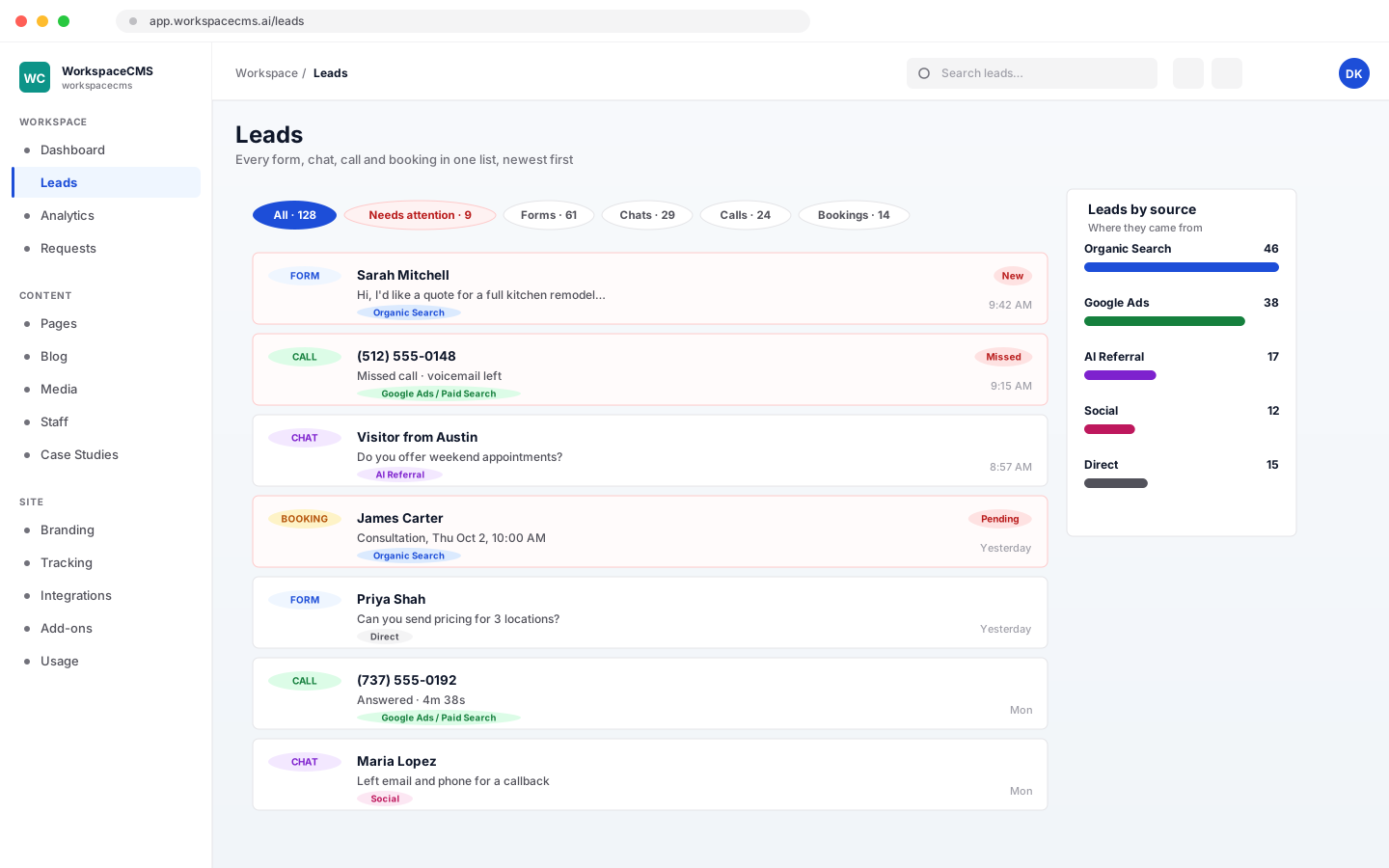
Missed calls are flagged in your Leads Inbox as needing attention.
You get a heads-up when you have used most of your included minutes.
One place for every lead
Calls land next to your forms, chats and bookings.
Every tracked call also appears in your Leads Inbox, alongside form fills, chat conversations and booking requests. Filter by where a lead came from, and missed calls are marked so nothing slips.
Call tracking is a paid add-on on Essentials, Growth, Premium and Ultra alike. It is billed on your existing WorkspaceCMS subscription, and you can change tiers or cancel from your dashboard.
For many small businesses it can be. If what you need is a tracking number per ad or source, recordings, transcripts, and a clear view of which calls were real leads, it is built into your WorkspaceCMS dashboard from $25/mo, so there is no separate call-tracking account to manage. It is not a copy of CallRail's feature list: there is no keyword-level tracking, no text messaging, and no call menus.
Which plans can add call tracking, and what does it cost?
It is a paid add-on on every WorkspaceCMS plan, and it is not included in any plan. Starter is $25/mo for 1 number and 150 minutes, Growth is $60/mo for 3 numbers and 450 minutes, Pro is $90/mo for 5 numbers and 750 minutes. Minutes past your bundle are $0.09 a minute, and each AI sort uses 1 AI credit.
Do callers know the call is recorded?
Yes. Before a call connects, the caller hears a short notice that the call may be recorded. Recording rules differ from state to state, so check what applies to your business.
What happens if I miss a call?
It is still logged as Missed with the caller's number and the time, you get an email within minutes, and it shows in your Leads Inbox as needing attention so you can call back.
Will the number on my website change on its own?
On a WorkspaceCMS site, yes: once call tracking is active, the click-to-call phone numbers on your pages switch to the tracking number that matches how the visitor found you. On a site hosted elsewhere, paste the snippet from your Phone Leads settings.
Can I use my existing phone number?
Your existing number stays your business line, and that is where tracking calls ring. The tracking numbers themselves are new local US numbers you choose by area code. Moving an existing number over, toll-free numbers and numbers outside the US are not offered.
Can I send texts or make calls from it?
No. Call tracking handles calls coming in to your tracking numbers. It does not send text messages or place outbound calls.
More tools
See what else your site runs on.
Every tool lives in the same dashboard as your site. Here are the others, each with its own walkthrough.